SnowPro Advanced Architect Certification Exam ARA-C01 Exam Questions
Preparing for the ARA-C01 exam is simple with CertsGate. We offer easy-to-understand study materials that help you learn the most important exam topics. You can study using our PDF questions, practice online with a real exam-style test, or use the desktop practice software. Choose the study method that works best for you and prepare at your own pace.
At CertsGate, we keep our ARA-C01 practice questions up to date. Whenever the exam syllabus or objectives change, we update our study materials so you always learn the latest topics. This helps you save time, avoid outdated content, and feel more confident when you take your exam.
Which technique will efficiently ingest and consume semi-structured data for Snowflake data lake workloads?
Correct Answer: C
Option C is the correct answer because schema-on-read is a technique that allows Snowflake to ingest and consume semi-structured data without requiring a predefined schema. Snowflake supports various semi-structured data formats such as JSON, Avro, ORC, Parquet, and XML, and provides native data types (ARRAY, OBJECT, and VARIANT) for storing them. Snowflake also provides native support for querying semi-structured data using SQL and dot notation. Schema-on-read enables Snowflake to query semi-structured data at the same speed as performing relational queries while preserving the flexibility of schema-on-read. Snowflake’s near-instant elasticity rightsizes compute resources, and consumption-based pricing ensures you only pay for what you use.
Option A is incorrect because IDEF1X is a data modeling technique that defines the structure and constraints of relational data using diagrams and notations. IDEF1X is not suitable for ingesting and consuming semi-structured data, which does not have a fixed schema or structure.
Option B is incorrect because schema-on-write is a technique that requires defining a schema before loading and processing data. Schema-on-write is not efficient for ingesting and consuming semi-structured data, which may have varying or complex structures that are difficult to fit into a predefined schema. Schema-on-write also introduces additional overhead and complexity for data transformation and validation.
Option D is incorrect because information schema is a set of metadata views that provide information about the objects and privileges in a Snowflake database. Information schema is not a technique for ingesting and consuming semi-structured data, but rather a way of accessing metadata about the data.
A new table and streams are created with the following commands:
CREATE OR REPLACE TABLE LETTERS (ID INT, LETTER STRING) ;
CREATE OR REPLACE STREAM STREAM_1 ON TABLE LETTERS;
CREATE OR REPLACE STREAM STREAM_2 ON TABLE LETTERS APPEND_ONLY = TRUE;
The following operations are processed on the newly created table:
INSERT INTO LETTERS VALUES (1, ' A ' );
INSERT INTO LETTERS VALUES (2, ' B ' );
INSERT INTO LETTERS VALUES (3, ' C ' );
TRUNCATE TABLE LETTERS;
INSERT INTO LETTERS VALUES (4, ' D ' );
INSERT INTO LETTERS VALUES (5, ' E ' );
INSERT INTO LETTERS VALUES (6, ' F ' );
DELETE FROM LETTERS WHERE ID = 6;
What would be the output of the following SQL commands, in order?
SELECT COUNT (*) FROM STREAM_1;
SELECT COUNT (*) FROM STREAM_2;
Correct Answer: C
In Snowflake, a stream records data manipulation language (DML) changes to its base table since the stream was created or last consumed. STREAM_1 will show all changes including the TRUNCATE operation, while STREAM_2, being APPEND_ONLY, will not show deletions like TRUNCATE. Therefore, STREAM_1 will count the three inserts, the TRUNCATE (counted as a single operation), and the subsequent two inserts before the delete, totaling 4. STREAM_2 will only count the three initial inserts and the two after the TRUNCATE, totaling 3, as it does not count the TRUNCATE or the delete operation.
How can the Snowflake context functions be used to help determine whether a user is authorized to see data that has column-level security enforced? (Select TWO).
Correct Answer: A, C
Snowflake context functions are functions that return information about the current session, user, role, warehouse, database, schema, or object. They can be used to help determine whether a user is authorized to see data that has column-level security enforced by setting masking policy conditions based on the context functions. The following context functions are relevant for column-level security:
current_role: This function returns the name of the role in use for the current session. It can be used to set masking policy conditions that target the current session and are not affected by the execution context of the SQL statement. For example, a masking policy condition using current_role can allow or deny access to a column based on the role that the user activated in the session.
invoker_role: This function returns the name of the executing role in a SQL statement. It can be used to set masking policy conditions that target the executing role and are affected by the execution context of the SQL statement. For example, a masking policy condition using invoker_role can allow or deny access to a column based on the role that the user specified in the SQL statement, such as using the AS ROLE clause or a stored procedure.
is_role_in_session: This function returns TRUE if the user’s current role in the session (i.e. the role returned by current_role) inherits the privileges of the specified role. It can be used to set masking policy conditions that involve role hierarchy and privilege inheritance. For example, a masking policy condition using is_role_in_session can allow or deny access to a column based on whether the user’s current role is a lower privilege role in the specified role hierarchy.
The other options are not valid ways to use the Snowflake context functions for column-level security:
Set masking policy conditions using is_role_in_session targeting the role in use for the current account. This option is incorrect because is_role_in_session does not target the role in use for the current account, but rather the role in use for the current session. Also, the current account is not a role, but rather a logical entity that contains users, roles, warehouses, databases, and other objects.
Determine if there are ownership privileges on the masking policy that would allow the use of any function. This option is incorrect because ownership privileges on the masking policy do not affect the use of any function, but rather the ability to create, alter, or drop the masking policy. Also, this is not a way to use the Snowflake context functions, but rather a way to check the privileges on the masking policy object.
Assign the accountadmin role to the user who is executing the object. This option is incorrect because assigning the accountadmin role to the user who is executing the object does not involve using the Snowflake context functions, but rather granting the highest-level role to the user. Also, this is not a recommended practice for column-level security, as it would give the user full access to all objects and data in the account, which could compromise data security and governance.
Context Functions
Advanced Column-level Security topics
Snowflake Data Governance: Column Level Security Overview
Data Security Snowflake Part 2 - Column Level Security
A table for IOT devices that measures water usage is created. The table quickly becomes large and contains more than 2 billion rows.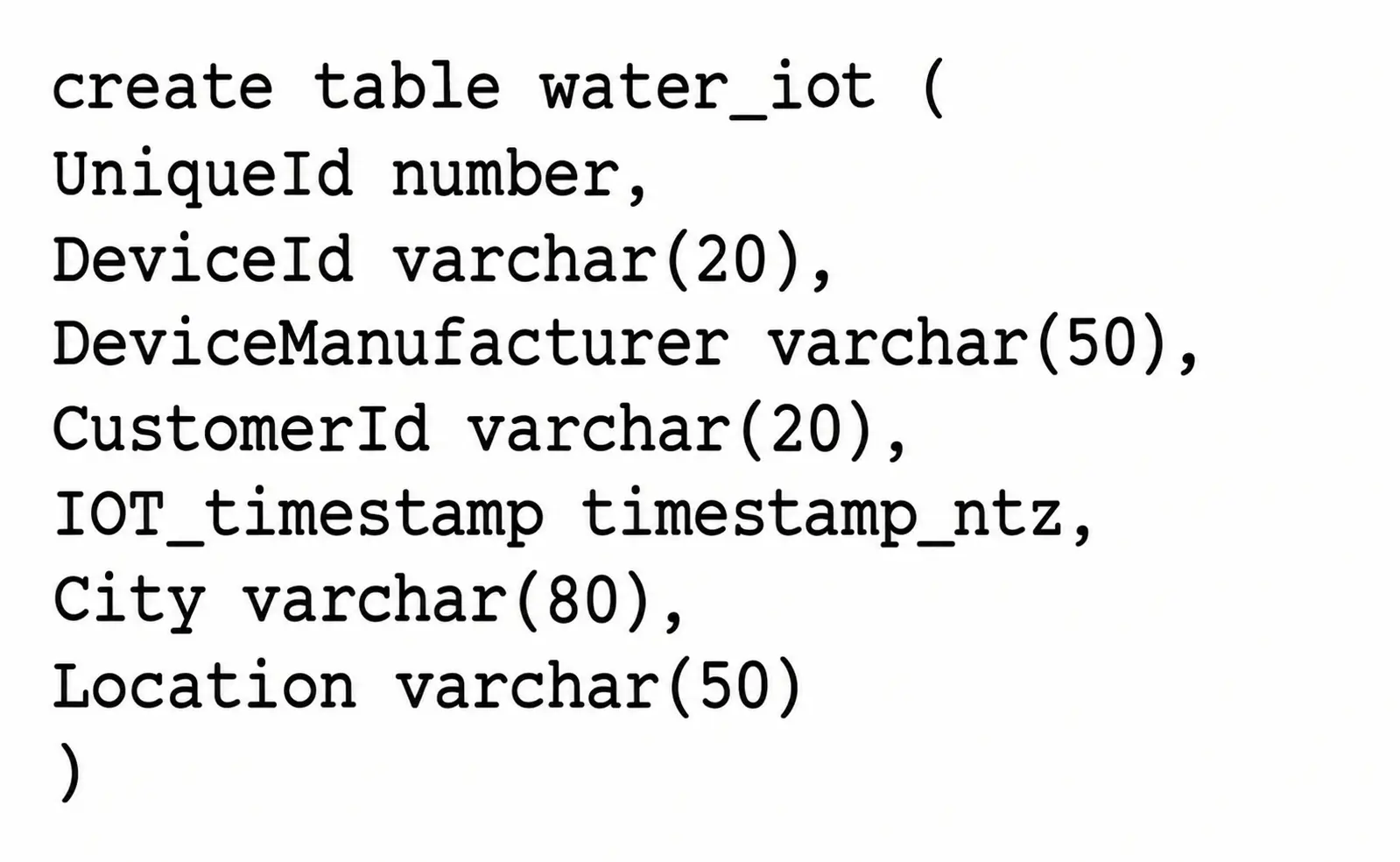
The general query patterns for the table are:
1. DeviceId, lOT_timestamp and Customerld are frequently used in the filter predicate for the select statement
2. The columns City and DeviceManuf acturer are often retrieved
3. There is often a count on Uniqueld
Which field(s) should be used for the clustering key?
Correct Answer: C
A clustering key is a subset of columns or expressions that are used to co-locate the data in the same micro-partitions, which are the units of storage in Snowflake. Clustering can improve the performance of queries that filter on the clustering key columns, as it reduces the amount of data that needs to be scanned. The best choice for a clustering key depends on the query patterns and the data distribution in the table. In this case, the columns DeviceId, IOT_timestamp, and CustomerId are frequently used in the filter predicate for the select statement, which means they are good candidates for the clustering key. The columns City and DeviceManufacturer are often retrieved, but not filtered on, so they are not as important for the clustering key. The column UniqueId is used for counting, but it is not a good choice for the clustering key, as it is likely to have a high cardinality and a uniform distribution, which means it will not help to co-locate the data. Therefore, the best option is to use DeviceId and CustomerId as the clustering key, as they can help to prune the micro-partitions and speed up the queries. References: Clustering Keys & Clustered Tables, Micro-partitions & Data Clustering, A Complete Guide to Snowflake Clustering
Which Snowflake objects can be used in a data share? (Select TWO).
Correct Answer: B, D
https://docs.snowflake.com/en/user-guide/data-sharing-intro